Showing posts with label JEE. Show all posts

Saturday, August 15, 2009

Say Hello

In previous article our Planet is capable of constructing a greeting message. This article shows how to make it possible for a client application to say hello to the Planet.


Alternative video format (mpg)

Let us create a PlanetService to expose the sayHello method to clients. We lookup the Planet from its name using the built in findByKey repository operation. In Sculptor model file this looks like this:
      Service PlanetService {
String sayHello(String planetName) throws PlanetNotFoundException;
}

Entity Planet {
gap
scaffold
String name key
Long population min="0"
Long diameter min="0" nullable
-Set<@Moon> moons opposite planet

Repository PlanetRepository {
findByKey;
}
}

All hand written java code we need to add is for testing and two trivial lines in PlanetServiceImpl:
    public String sayHello(ServiceContext ctx, String planetName)
throws PlanetNotFoundException {

Planet planet = getPlanetRepository().findByKey(planetName);
return planet.greeting();
}

Saturday, August 8, 2009

Testing is Simple

In previous articles we created a simple helloworld application without any tests. This article shows how to do integration testing of services with Sculptor.


Alternative video format (mpg)

We turn on generation of junit test and complete the failing tests from previous articles. For each Service there is a generated JUnit test class that we are encouraged to implement. It uses Spring transactional test fixtures and DbUnit.

Spring beans are injected in the test with ordinary @Autowired annotations.

public class PlanetServiceTest extends AbstractDbUnitJpaTests
implements PlanetServiceTestBase {
private PlanetService planetService;

@Autowired
public void setPlanetService(PlanetService planetService) {
this.planetService = planetService;
}

@Test
public void testFindById() throws Exception {
Planet found = planetService.findById(getServiceContext(), 1L);
assertEquals("Earth", found.getName());
}

@Test
public void testFindAll() throws Exception {
List<Planet> found = planetService.findAll(getServiceContext());
assertEquals(2, found.size());
}

@Test
public void testSave() throws Exception {
int countBefore = countRowsInTable("PLANET");
Planet planet = new Planet("Pluto");
planet.setPopulation(0L);
planetService.save(getServiceContext(), planet);
assertEquals(countBefore + 1, countRowsInTable("PLANET"));
}

@Test
public void testDelete() throws Exception {
int countBefore = countRowsInTable("PLANET");
Planet planet = planetService.findById(getServiceContext(), 2L);
planetService.delete(getServiceContext(), planet);
assertEquals(countBefore - 1, countRowsInTable("PLANET"));
}
}


The initial test data is defined in DbUnit xml file. The database is refreshed for each test method.
<?xml version="1.0" encoding="UTF-8"?>

<dataset>
<PLANET ID="1" NAME="Earth" POPULATION="7000000000" VERSION="0"/>
<PLANET ID="2" NAME="Jupiter" POPULATION="0" VERSION="0"/>
<MOON/>
</dataset>


Above tests only covers the normal cases so far and we should of course do more tests for exceptional cases and validation boundaries, such as negative population.

The tests illustrated here are kind of integration tests and you should do ordinary unit tests for domain objects and other classes of importance.

Tuesday, July 28, 2009

The World is Changing

In the previous article the simple helloworld application consisted of one single domain object, the Planet. In this article I will add some more features to the picture, including an association to the Moons of the Planet.


Alternative video format (mpg)

It is good to have a natural business key, which is used for equals and hashCode. The name of the Planet is a candidate. Let us add some properties for the population and diameter of the Planet also. Hibernate validator is supported and validations can be defined directly in the model, e.g. min="0".


We add the Moon Entity and its association to Planet.


Build and start Jetty. The changes are immediately reflected in the generated CRUD GUI.


The DSL and the code generation drives the development and is not a one time shot. The application can be developed incrementally with an efficient round trip loop.

Wednesday, July 22, 2009

Jump Start

This article illustrates the first basic steps of how to use Sculptor. We will create a simple hello world application. It will only have one simple domain object and some CRUD operations.


Alternative video format (mpg)
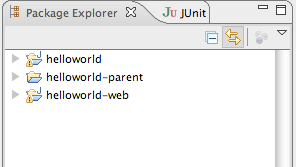
We start by firing off some maven archetype commands to create the business and presentation tier projects. The sculptor archetypes creates maven pom files with needed dependencies. We generate eclipse projects from those maven projects using the ordinary maven-eclipse-plugin. These projects are imported into Eclipse. You find the commands for this in the wiki.

We open the design model that is the input to the code generator. It is a textual DSL that defines the application structure. We define the Planet Entity in a Module.
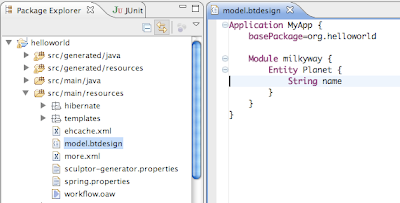


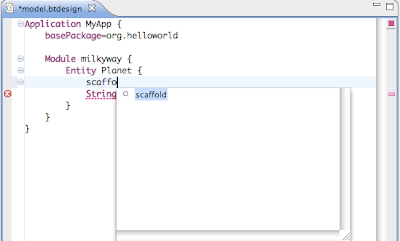
We also need some CRUD operations to be able to do something with the Planet in the to be generated GUI. It is easiest to add those with the scaffold keyword. Note that the DSL editor has support for code completion, error highlight and outline view (including ctrl+O).
Now it is time to generate code, but first we will turn off one feature. Sculptor promotes writing junit tests, but for this demo we turn off that by adding a property to sculptor-generator.properties.
generate.test=false
We build the application by executing mvn install from the -parent project. The code generation is part of the maven build cycle.

We start the web application server by running mvn jetty:run from the -web project. Note that this is also a maven command, and no specific installation of an application server and database is required. Hsqldb inmemory database is used.

The generated CRUD GUI is available at http://localhost:8080/helloworld-web/
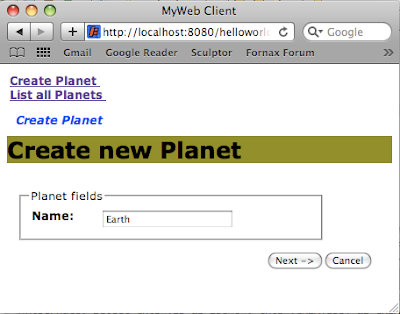


That was everything needed to create a minimal application. It illustrates how easy it is to get started. Within 15 minutes you can go from scratch to a running application, including build scripts, Eclipse projects, domain model, JPA persistence, services, Web Flow application and much more. Thereafter you can continue by evolving the design, add manual code and regenerate.

This was an extremely simple example. Sculptor can be used for much more advanced applications. The CRUD GUI is useful for administrative sections of the application or to serve as a scaffolding for your manually crafted user interface. The major strength of Sculptor is in the business tier when developing typical enterprise or web applications that benefit from a rich and persistent domain model.

Saturday, June 27, 2009

What is Sculptor?

Sculptor is an open source productivity tool that applies the concepts from Domain-Driven Design and Domain Specific Languages.

You express your design intent in a textual DSL, from which Sculptor generates high quality Java code and configuration. It is not a one time shot. The application can be developed incrementally with an efficient round trip loop.

Sculptor is useful when developing typical enterprise or web applications that benefit from a rich and persistent domain model. Sculptor also provides a sophisticated CRUD GUI for administrative sections of the application or to serve as a scaffolding for your manually created pages.

The generated code is based on well-known frameworks, such as JPA, Hibernate, Spring Framework, Spring Web Flow, JSF, RCP, and Java EE.

Product characteristics:
  • Easy to learn, intuitive syntax of the textual DSL, editor with error highlight, code completion, and outline
  • Quick development round trip, it is not a one time generation
  • Existing IDE tools, such as refactoring, code assist and debugger will continue to be of service to you
  • High quality of generated code, based on well known frameworks, best practices, and a lot of experience
  • Great extensibility and customization options
  • Easy to remove the tool, no runtime magic
Visit the Fornax Sculptor web site to learn more and try it.